|
|||||||
 |
 |
 |
 |
 |
 |
 |
 |
 |
|||||||
|
|||||||
|
|
|
|
|
|
|
|
|
|||||||
|
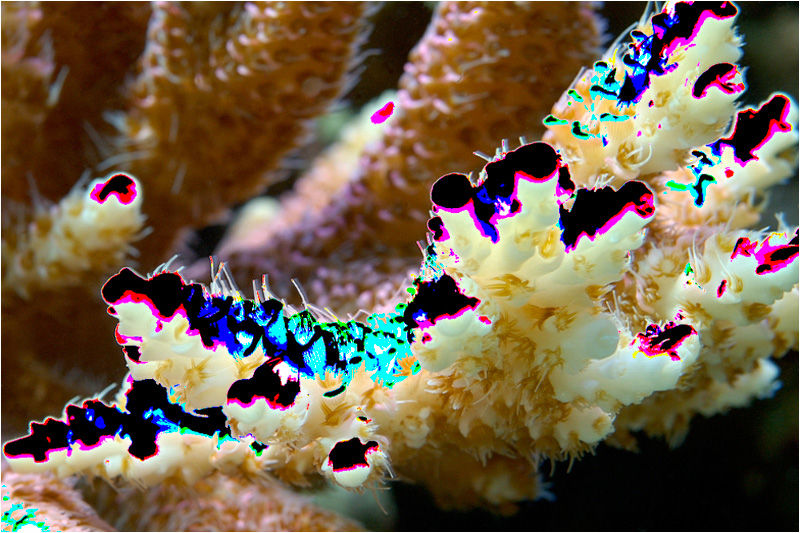
Is there also a blinky lowlights? Why are we concerned with only highlight detail and not shadow detail? Our eyes are attuned to focus on bright objects. In photographs, the brightest areas subconsciously draw our attention. Detail lacking in this area, therefore, becomes disturbingly apparent. Take a round monotonic object and shine a light on it. We will notice a smooth graduation from white to dark. This represents a tonal range from 255 to 0. Now take a spot half way up, it will be approximately a middle gray. If we tell the camera this is the maximum value of 255, the camera assumes this middle-gray is white. If we were to progress up the ball, toward the light source, values will exceed 255, however, it is still recorded as 255. So even though one pixel may be at 255 and its neighbor at 300 both are recorded as 255. The net result is that no data is recorded for information in excess of 255. The resulting image will have half the ball being pure white. If attempt to correct this in post processing so that the middle-gray has a value of 128, the pure white areas will also turn to a monotonic gray area - devoid of detail. When we clip the shadows, the visual result is quite different. Although the shadow areas are devoid of details, we simply interpret that as being a deep dark shadow. It does not necessarily detract from the overall photograph.
Inevitably, highlights will be blown somewhere in the image due to the limited dynamic range of digital cameras. In general, if the highlights are blown on the subject, we need to dial down the exposure to recover that information. If information is lost in the background, this becomes less of an issue unless it deters from the composition of the photograph. Analogous to the histogram, each channel can be checked, usually through post-processing software, for blown highlights. In the example above, the black areas indicate clipping of all three RGB channels, so the area is pure white. The blue areas indicate clipping of the blue channel, the red areas indicate clipping of the red channel, and the cyan area indicates clipping of the green channel. Use of blinky highlights in conjunction with the histogram allows us to maximize settings to contain the most vivid color and extract the most detail possible from each image.
|
|
|
|